Solutions
Digital Workplace & Microsoft 365 for MEA Businesses
Overview
Create a workplace where people can collaborate effortlessly, access tools securely, and stay productive, wherever they are. Our Digital Workplace solutions are designed to remove friction, enhance user experience, and enable secure flexibility across devices, locations, and work styles. Whether you’re supporting frontline teams, rolling out hybrid policies, or transforming the way your teams work, we help you build the digital foundations that scale with your business.
Empower your workforce with secure access to tools, systems, and collaboration platforms, wherever they are. From device lifecycle to hybrid meeting spaces, we build digital workplaces that drive productivity and simplify IT.
Work is no longer a place, it's an activity. Employees expect to access their email, documents, apps, and collaboration tools wherever they are, on whatever device they're using. But without the right architecture, this flexibility can introduce real risk and complexity.
At 4FRONT Technologies, we help you deliver seamless, secure access to productivity tools like Microsoft 365, Teams, SharePoint, and OneDrive. Whether your team is in the office, remote, or on the move, we make sure they can stay connected, without compromising control or security.
What This Solution Delivers
- Unified access to email, files, and collaboration platforms across all devices
- Consistent user experience with Microsoft 365 and Teams
- Secure single sign-on (SSO) and multi-factor authentication (MFA)
- Access control based on role, location, device, and risk level
- Strong governance for data protection, file sharing, and usage monitoring
- Simplified onboarding/offboarding for hybrid and remote workers
Key Use Cases
- Enabling hybrid or remote work across a distributed team
- Ensuring BYOD (Bring Your Own Device) environments are secure and compliant
- Managing access for contractors, vendors, or temporary workers
- Deploying Microsoft 365 in a scalable, governance-driven way
- Supporting secure mobile access across iOS, Android, Windows, and macOS
Our Approach
1. Discovery & Identity Strategy
We begin by assessing your current access landscape, directory setup, and business policies. We help define user groups, access profiles, conditional policies, and licensing.
2. Microsoft 365 Enablement
We configure Exchange Online, SharePoint, OneDrive, and Teams with the correct structure, sharing settings, retention policies, and compliance guardrails.
3. Secure Sign-In & Authentication
Using Microsoft Entra ID (Azure AD), we implement:
- Seamless Single Sign-On (SSO)
- Multi-Factor Authentication (MFA)
- Conditional Access Policies (e.g. block access from risky locations/devices)
- Risk-based sign-in protection
4. Device-Aware Access
Whether corporate-managed or BYOD, access is granted based on real-time device health and compliance using Microsoft Intune. Jailbroken phones or unpatched laptops? Blocked automatically.
5. File & Collaboration Governance
We help you control how documents are shared internally and externally. Data Loss Prevention (DLP), sensitivity labels, and file encryption policies are applied to protect confidential data.
6. User Enablement
We provide onboarding training, cheat sheets, and live support so employees know how to access what they need, and how to use the tools securely and productively.

Tech Stack
- Core Platforms: Microsoft 365 (Exchange, SharePoint, OneDrive, Teams)
- Identity & Access: Microsoft Entra ID, Conditional Access, MFA
- Device & App Management: Microsoft Intune
- Governance & Security: Microsoft Purview, Defender for O365, DLP, Sensitivity Labels
- Productivity Tools: Teams, Office Apps, Planner, To Do, Bookings

Why 4FRONT?
- Real-world deployment experience across enterprise, SME, and education
- MEA-based engineering teams
- Hands-on user enablement, not just configuration
- Deep Microsoft ecosystem knowledge
- Focus on governance, security, and operational readiness
Get Everyone Working, Securely
This isn’t just about licensing Microsoft 365 it’s about giving your people the tools to work productively from anywhere, with confidence that your data and access controls are in place.
Let’s enable secure access for your workforce — wherever they are.
or follow us on LinkedIn for updates.
Your employees depend on their devices to stay productive, and your business depends on those devices being secure, supported, and well-managed. Whether you’re onboarding a new joiner, scaling across multiple offices, or refreshing your fleet, it’s essential to have a clear, controlled approach to the full device lifecycle.
At 4FRONT Technologies, we provide end-to-end lifecycle management for laptops, desktops, tablets, and mobile devices, from day one provisioning through to secure retirement. We help you standardise, simplify, and support your endpoint estate at every stage.
What This Solution Delivers
- Streamlined procurement, imaging, and deployment of devices
- Centralised management with MDM (Microsoft Intune or others)
- Proactive maintenance, patching, and compliance monitoring
- Warranty tracking, support SLAs, and vendor escalation
- Secure disposal and asset recovery at end-of-life
- Integration with HR and IT onboarding/offboarding workflows
Common Use Cases
- Rapid onboarding of new employees with pre-configured devices
- Remote shipping and setup for distributed or hybrid teams
- Hardware refresh projects tied to support lifecycles or OS upgrades
- Consolidation and standardisation of disparate device types
- Tracking and managing warranty and support status across large fleets
- Secure device disposal with certified data wipe and documentation
Our Approach
1. Device Strategy & Procurement Support
We help define device standards per user role, balancing performance, supportability, and cost. We then manage vendor engagement and procurement on your behalf including bundling, custom imaging, and logistics.
2. Imaging, Configuration & Deployment
Using Microsoft Intune (Autopilot) or custom imaging tools, we provision devices with the right OS, apps, policies, and security settings. Devices can be shipped directly to users or staged onsite.
3. Management & Support
We manage your device fleet through:
- Patch management and monitoring
- Security enforcement (BitLocker, Defender, compliance)
- Health checks and remote troubleshooting
- Integration with your helpdesk or managed support partner
- Automated alerts and asset change tracking
4. Warranty, Repair & Vendor Coordination
We maintain warranty logs and act as a liaison with OEMs to ensure fast resolution on hardware faults. We offer support SLAs for collection, replacement, or on-site response depending on your coverage model.
5. End-of-Life & Secure Disposal
When devices reach the end of their lifecycle, we manage:
- Secure wipe using certified software
- Asset de-tagging and documentation
- Return logistics or certified destruction
- Environmental compliance and reporting
Tech Stack
- MDM & Lifecycle Tools: Microsoft Intune, Autopilot, JAMF, HP MIK
- Security & Compliance: Defender for Endpoint, BitLocker, CIS Baselines
- Procurement & Staging: Lenovo, Dell, HP, Apple
- Disposal & EOL: Blancco, Re-Tek, Sims Lifecycle Services
- Support Integration: SuperOps.ai, Odoo, ServiceNow, Freshservice

Why 4FRONT?
- Proven experience across multi-site and remote workforce environments
- Pre-staging and configuration logistics in both MEA
- Hardware vendor relationships for pricing, warranty and escalation
- Lifecycle thinking: from Day 1 to end-of-life, we plan the whole journey
- Flexible support models: per device, per user, or per location
Make Devices One Less Thing to Worry About
With the right lifecycle processes in place, your users stay productive and secure, and your IT team gets time back to focus on what matters most.
Let’s take care of your devices, so your people can take care of the business.
or follow us on LinkedIn for updates.
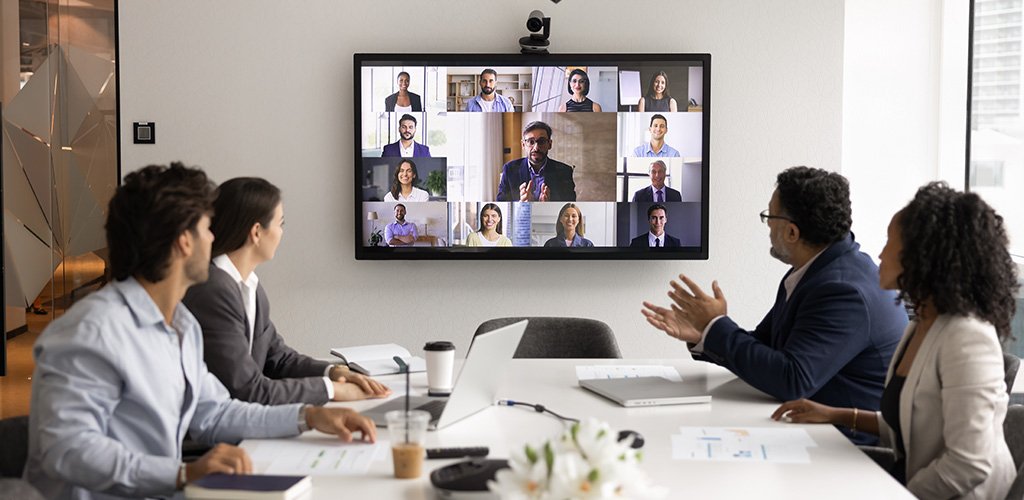
The workplace has changed and meetings have too. Whether your team is onsite, remote, or a mix of both, every meeting room needs to deliver a seamless, high-quality experience that brings people together without technical delays or confusion.
At 4FRONT Technologies, we design, install, and support modern AV and collaboration spaces that are simple to use, fully integrated, and consistent across your office footprint. With Microsoft Teams Rooms and smart AV hardware, your hybrid meetings run smoothly — every time.
What This Solution Delivers
- Professional, user-friendly meeting rooms that work at the touch of a button
- Seamless Microsoft Teams, Zoom, or multi-platform integration
- Room designs tailored for small huddles to large boardrooms
- Reliable AV hardware with ongoing support and monitoring
- Reduced setup time and tech support requests
- A consistent user experience across locations and teams
Use Cases We Support
- Boardroom redesigns with multi-screen setups and smart video
- New office fit-outs with Teams Rooms and integrated AV
- Hybrid working strategies needing consistent room tech across sites
- Poor user experience with outdated or incompatible AV equipment
- IT teams overloaded with meeting room support tickets
- Event or webinar rooms needing multi-camera and broadcast capability
Our Approach
1. Room Discovery & Design
We assess your space, usage needs, and collaboration tools to design rooms that match your workflow, from small focus rooms to executive boardrooms.
- Acoustic treatment and layout
- Screen placement and cabling
- Furniture and hardware compatibility
- Lighting and sensor considerations
2. Hardware Selection
We specify and supply the right AV hardware based on your platform (Teams, Zoom, Google Meet) and room type. This may include:
- Touch panels and room controllers
- Certified audio bars and microphones
- PTZ cameras with auto-framing
- Wireless presentation systems
- Large format displays or projectors
- Room scheduling panels
3. Installation & Integration
Our certified engineers handle all deployment, including:
- Cabling and bracket installation
- Network and power integration
- Firmware updates and platform configuration
- Join-by-code or one-touch join setup
4. User Training & Room Guides
We equip your users with simple visual guides, cheat sheets, and training sessions so everyone can run meetings without needing IT help.
5. Monitoring & Support
Optional managed services include:
- Proactive monitoring and alerts
- AV hardware health dashboards
- Remote support for in-room issues
- SLA-based replacement or escalation
Tech Stack
- Core Platforms: Microsoft Teams Rooms, Zoom Rooms
- AV Hardware Partners: Logitech, Poly, Yealink, Crestron, Jabra, Neat, Barco
- Control & Scheduling: Crestron, Logitech Tap, Yealink RoomPanel
- Cabling & Fit-out: Kramer, HDBaseT, custom cabling
- Monitoring Tools: Microsoft Teams Admin Centre, RoomView, Logitech Sync

Why 4FRONT?
- Certified Microsoft Teams Rooms deployment partner
- AV and collaboration experience across MEA
- Local installation teams with end-to-end project ownership
- Integrated approach: AV, IT, cabling, support
- Long-term support and refresh strategy
No More 'Can You Hear Me?' Moments
A modern meeting room should be simple, consistent, and ready when you are. Let’s design a collaboration space your teams actually enjoy using — and your IT team doesn’t have to babysit.
Speak to us about a smart meeting room fit for hybrid work.
or follow us on LinkedIn for updates.
In today’s hybrid work environment, users expect to access company systems from anywhere, but every sign-in, every device, and every identity is a potential risk if not properly managed.
At 4FRONT Technologies, we help you take full control of access and authentication, enforcing consistent policies across all users, devices, and apps. Whether it’s laptops, mobiles, guest devices, or third-party tools, we ensure secure access without slowing your business down.
What This Solution Delivers
- Unified identity and access control across all platforms
- Secure sign-ins with Multi-Factor Authentication (MFA)
- Conditional Access based on location, device compliance, or risk level
- Device compliance enforcement for BYOD and corporate endpoints
- Central visibility into who has access to what
- Reduced attack surface from stolen credentials or rogue devices
Use Cases We Support
- Enforcing MFA for all cloud services and apps
- Blocking risky sign-ins from unknown or high-risk locations
- Restricting access to company files unless from a compliant device
- Rolling out new security baselines during mergers or acquisitions
- Simplifying user access control during onboarding/offboarding
- Building a secure foundation for ISO 27001 or NIST frameworks
Our Approach
1. Identity Architecture & Audit
We assess your current identity and access setup, including user roles, group structure, guest access, and federation. We identify gaps in your authentication posture and recommend best practices for improvement.
2. Modern Authentication Rollout
We implement secure sign-in policies with:
- Azure AD or Entra ID configuration
- Multi-Factor Authentication (MFA) rollout and end-user communication
- SSO integration with apps like Salesforce, Zoom, ServiceNow, etc.
- Self-service password reset and identity protection
3. Conditional Access Policies
We design intelligent access policies to protect your systems without over-blocking:
- Block access from unknown or unmanaged devices
- Require MFA for high-risk or new locations
- Limit access to sensitive apps based on user risk score
- Enforce session timeouts and re-authentication
4. Device Compliance & Endpoint Policies
We integrate Microsoft Intune or equivalent MDM solutions to ensure that only secure, up-to-date devices can access company data. This includes:
- Compliance policies for OS version, antivirus, encryption
- BYOD registration and app protection policies
- Remote wipe and lost device management
5. Governance & Reporting
We provide dashboards and audit logs so you can track:
- Who accessed what and when
- Risky or failed sign-ins
- Policy enforcement and exceptions
- Licence usage and adoption
Tech Stack
- Identity Platforms: Microsoft Entra ID (formerly Azure AD), Google Workspace Identity, Okta
- Device Management: Microsoft Intune, JAMF, VMware Workspace ONE
- MFA Providers: Microsoft Authenticator, Duo, Google Authenticator
- Policy Enforcement: Conditional Access, Defender for Identity, Microsoft 365 Compliance
- User Provisioning: SCIM, SAML, Just-in-Time (JIT)

Why 4FRONT?
- Identity and access design aligned to Zero Trust
- Proven rollouts for mid-sized and enterprise customers
- Integration across Microsoft 365, SaaS, and legacy environments
- Practical security without frustrating end users
- Ongoing management or handover to your IT team
One Identity, Total Control
When access is secure and device policies are enforced, your people can move faster — without opening the door to threats. Let us help you lock it down properly.
Talk to us about securing your organisation with intelligent access control.
or follow us on LinkedIn for updates.
Modern businesses operate across borders, time zones, and device types. Whether it’s a corporate laptop, a personal smartphone, or a contractor’s tablet, every device accessing your systems presents a risk — unless it’s properly managed and compliant.
At 4FRONT Technologies, we deliver device security and compliance frameworks that ensure every endpoint meets your organisation’s standards. From deployment to decommissioning, we help you monitor, control, and secure every device in your ecosystem — without slowing users down.
What This Solution Delivers
- Full visibility of all devices connected to your environment
- Automated compliance checks and non-compliance remediation
- Endpoint protection (EDR/XDR) against viruses, malware, and advanced threats
- Encryption enforcement and secure data access policies
- Geo-fencing and conditional access based on risk
- Real-time reporting and alerts for non-compliant devices
- Simplified remote management and patching
- Policy alignment with regulatory or industry frameworks (e.g., ISO, NIST, HIPAA)
Use Cases We Support
- Enforcing encryption and password policies on all employee laptops
- Blocking access from jailbroken or rooted mobile devices
- Providing secure access to apps for field engineers using tablets
- Managing patching and security baselines for remote teams
- Ensuring only compliant devices can access sensitive systems
- Proactive remediation of outdated or vulnerable endpoints
- Streamlining compliance audits with device-level reporting
Our Approach
1. Device Audit & Onboarding
We begin with an assessment of your existing devices, their management status, security posture, and lifecycle stage. We’ll map this against your policies and help onboard devices into the right platform.
2. Mobile Device & Endpoint Management
We implement or fine-tune your endpoint management system, ensuring:
- Central visibility of all Windows, macOS, iOS, and Android devices
- Device enrolment policies for both BYOD and corporate assets
- Automated compliance enforcement (AV, encryption, OS version)
- Remote wipe, lock, and device recovery
3. Endpoint Security & Threat Protection
We layer in next-generation endpoint security to defend against real-world threats:
- Microsoft Defender for Endpoint or your chosen EDR/XDR solution
- Threat detection, isolation, and remediation
- AI-driven behavioural analytics and ransomware protection
- USB control, firewall, and web filtering policies
4. Compliance & Governance
We align your device controls with internal and external governance standards:
- Custom compliance policies per user role or geography
- Built-in audit logs and tamper protection
- Geo-fencing, VPN enforcement, and conditional access
- Ongoing monitoring for high-risk or non-compliant endpoints
5. Support & Lifecycle Management
We help manage devices across their full lifecycle:
- Provisioning and secure imaging
- Self-service portals for password reset or support
- Integration into HR and onboarding/offboarding workflows
- Secure device decommissioning and data sanitisation
Tech Stack
- Endpoint Management: Microsoft Intune, JAMF, VMware Workspace ONE, Cisco Meraki
- Security & Compliance: Microsoft Defender for Endpoint, Bitdefender, CrowdStrike, SentinelOne
- Compliance Frameworks: ISO 27001, NIST 800-171, HIPAA, MEA NESA
- Reporting & Automation: Microsoft Compliance Manager, Power BI, Custom dashboards
- Integration Tools: Azure AD, Entra ID, ServiceNow, Autopilot

Why 4FRONT?
- Deep expertise in managing remote and hybrid workforce environments
- Cross-platform support across mobile, desktop, and IoT devices
- Local and global compliance experience (MEA)
- Practical approach to device security – no overkill, just the right level
- Scalable model for growing or distributed teams
Secure Devices, Confident Teams
When every device is compliant, protected, and monitored, your team can work with freedom and confidence — from the office, from home, or anywhere in between.
Speak to us about building an endpoint compliance model tailored to your workforce.
or follow us on LinkedIn for updates.
The best technology is only as good as your people’s ability to use it. Whether it's Microsoft 365, cloud platforms, collaboration tools, or line-of-business applications, users need confidence, not just access.
At 4FRONT Technologies, we empower teams through targeted training, onboarding, and support that matches how people actually work. We bridge the gap between IT capability and day-to-day usability, driving adoption, minimising support tickets, and unlocking productivity across your organisation.
What This Solution Delivers
- Full visibility of all devices connected to your environment
- Automated compliance checks and non-compliance remediation
- Endpoint protection (EDR/XDR) against viruses, malware, and advanced threats
- Encryption enforcement and secure data access policies
- Geo-fencing and conditional access based on risk
- Real-time reporting and alerts for non-compliant devices
- Simplified remote management and patching
- Policy alignment with regulatory or industry frameworks (e.g., ISO, NIST, HIPAA)
Use Cases We Support
- Enforcing encryption and password policies on all employee laptops
- Blocking access from jailbroken or rooted mobile devices
- Providing secure access to apps for field engineers using tablets
- Managing patching and security baselines for remote teams
- Ensuring only compliant devices can access sensitive systems
- Proactive remediation of outdated or vulnerable endpoints
- Streamlining compliance audits with device-level reporting
Our Approach
1. Discovery & Needs Assessment
We assess your current toolset, team structure, and user maturity to design a fit-for-purpose enablement plan. This includes:
- Stakeholder interviews
- Skills gap analysis
- Review of ticket trends to identify pain points
- Mapping tools to team-specific workflows
2. Tailored Training Programmes
We build and deliver bespoke training based on the roles and systems in your business:
- Role-based learning paths for sales, finance, ops, etc.
- Modular sessions (30–60 mins) that respect your team’s time
- In-person, virtual, and on-demand formats
- Ongoing “drop-in clinics” for support and questions
- Quick-reference guides, tip sheets, and explainer videos
3. Support & Continuous Enablement
Training doesn’t stop at deployment. We provide:
- User feedback surveys and adoption metrics
- Refresher training aligned to new features and changes
- Dedicated end-user support with multilingual options
- Escalation pathways to technical teams when needed
- Quarterly enablement plans and usage reviews
4. Executive & Power User Support
We deliver white-glove support for executives and power users:
- Tailored workflows for inbox and calendar management
- Power BI dashboards, OneNote notebooks, and personal productivity tools
- One-on-one coaching and on-call support when needed
5. Support & Lifecycle Management
We help manage devices across their full lifecycle:
- Provisioning and secure imaging
- Self-service portals for password reset or support
- Integration into HR and onboarding/offboarding workflows
- Secure device decommissioning and data sanitisation
Tech Stack
- Training Delivery: Microsoft Viva Learning, SharePoint, MS Teams, Zoom, Google Workspace
- Support Tools: Odoo Knowledge, SuperOps.ai, custom portals, chatbots
- Analytics & Adoption: Power BI, Microsoft Productivity Score, feedback tools
- Learning Management Systems (LMS): Optional integration with client platforms
Why 4FRONT?
- Deep understanding of user behaviour and learning styles
- Trainers with real-world business experience – not generic presenters
- Localised training with support for MEA teams
- Outcome-based approach: we measure adoption, not attendance
- Ability to scale programmes across departments and regions
Empowered Users. Better Outcomes.
The return on your IT investment depends on people knowing how to use it. We help your team not just use technology, but thrive with it.
Let’s create a user enablement plan that drives real adoption, confidence, and impact.
or follow us on LinkedIn for updates.